
How I vibe-coded the same GTM tool thrice
A walk-through of my full (roundabout) process trying to build an AI GTM partner to help craft strategic GTM narratives.

In last week’s post I mentioned Palm Tree - my attempt at learning how to use Claude Code by vibe-coding an app to help with my GTM strategy work. This won’t be news to literally everyone else who has been vibe-coding for months, but as someone who hasn’t had to actively code things since uni, there is a special joy in getting GitHub set up and then just blahing out your ideas to Claude who asks thoughtful and systematic questions about what you’re trying to create.
Build #1: The premise I started with was that I wanted an app to help me build strategic GTM narratives.
The first step was to break down to process of crafting a strategic narrative into 4 stages:
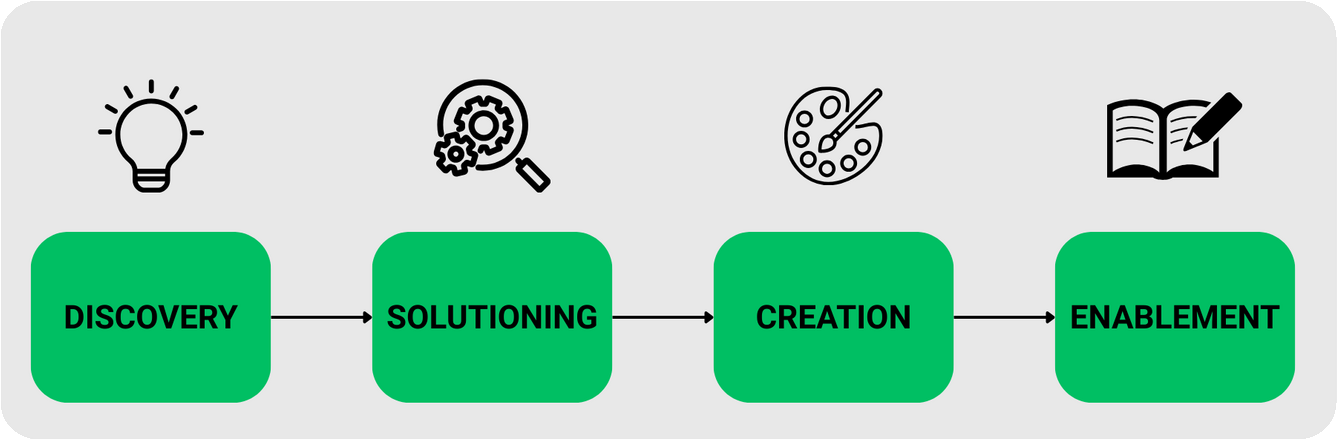
Discovery > Solutioning > Creation > Enablement
I knew that AI could improve any one of these stages and it would have an impact, either making things go faster or have better quality overall. So I started with the Discovery stage and got to work defining what questions and interaction I would want an app to do to capture all the details and context of the prospect and opportunity.
Right away I had my first realisation:
Claude Code shows you right away just how great (or shit) your idea is.
In my case, it was the latter for quite a lot of the early iterations and even now I’d say I’m still working through getting it to a place where it’s better than my manual process.
Having a discovery Q & A app is great in theory, but there is a reason why humans like to do discovery in workshop-style sessions or with open ended-questions because going back and forth with an app one-by-one is BORING!
The app exposed one of the most basic limitations of how AI handles discovery, it can ask questions and get some information but it can’t read a room and it can’t tell when I’m answering absolute garbage in a form just to get to an output. That’s the human part it can’t replace (yet).
At this point I started to try to move into stage 2 (mostly because I needed a break from the discovery part of the app). But in my effort to crystallise for Claude what a person would do with the information provided in the discovery and how they would systematically think it through and try to come up with solutions… the ADAPT framework came to be. Admittedly Claude came up with this but I will take credit for the inputs that went into its creation.
ADAPT framework — a set of five inputs I think any ad tech pitch needs to be built on:
A — Advertising Stack Today
D — Desired Outcomes
A — Audience and Measurement Goals
P — Pain and Gaps
T — Trigger and Timeline
This is where Palm Tree is at right now. It runs locally and I am using the API to have an interactive conversation in the app to arrive at an ADAPT framework output. I haven’t figured out what the next step should be here but for now I’ll be gathering feedback on the other two builds below to enhance the Discovery stage.
Build #2: Happened at work when Copilot launched a couple of Agents that got me inspired to test their custom Agent Builder. I figured I could build a simplified version of Palm Tree to gather feedback from colleagues and improve over time. And wouldn’t you know, I got it to a similar stage as Palm Tree in half the time! Which brings me to my next realisation:
Constraints help you decide on the simplest working version of your idea.
In my case, our work Copilot instance doesn’t have full access to all out files and history which meant the agent had to get super good at getting all my knowledge fast and showing me what it could do with even a little bit of info. I adapted my first Copilot Agent from a base template in Microsoft’s help pages. In a somewhat recursive format, I asked Copilot to help me write instructions for itself. Which either says something interesting about AI or something worrying about my process. Probably both. It could improve the language and structure, but only because I already knew what the agent needed to do. I went from a couple of hours of tinkering with Palm Tree to a fully functioning agent that delivers a useable output in less than an hour.
Build #3 was probably the simplest of all because it was just a matter of converting my Copilot Agent instructions to Claude Skills. I actually just did this in a chat with no issues.
What I didn’t realise until this point is that Claude Skills was one of the first things people recommended when I said I wanted to build a GTM tool. In my excitement and FOMO over new tools I chose to ignore that advice and dive into Claude Code instead, which is objectively the harder place to start. So yes, I could have done this six weeks ago and saved myself a lot of time!
But then I wouldn’t have the ADAPT framework, wouldn’t have had to think hard about what discovery actually requires, and wouldn’t have a half-built Flask app sitting on GitHub that I’m low-key proud of. Sometimes the inefficient path is the one worth taking. :)
Looking back at all three builds, each version took less time than the last. Palm Tree took the longest because I was figuring out what I was even trying to build and I got so excited and distracted by the possibilities. The Copilot agent took under an hour because I already knew what I wanted and I could use the AI to write its own instructions. The Claude skill took almost no time at all because the thinking was already done.
The building isn’t the hard part. Knowing what to build, and being specific enough about your domain that the output is actually useful, that’s where the time goes. The ADAPT framework didn’t come from knowing how to code. It came from over a decade of knowing what makes an ad tech pitch work.
If you’re sitting on that kind of expertise in your own domain, the barrier to building something useful is much lower than it looks.
The Final Output:
In this GitHub Repo you’ll find:
Claude Skill for GTM Narrative Partner: You can copy the skill folder into your skills directory and it’ll be available as a slash command
Claude Project Instructions for GTM Narrative Partner in a .TXT file: If you use Claude.ai without Claude Code, you can paste this into your Claude Project Instructions.
Microsoft Copilot Agent Instructions for GTM Narrative Partner in a .TXT file: Which you can reference and edit in your own instance of the Agent Builder